TABULA PUBLISHERS


Escape Nexus Gameplay Trailer
Escape Nexus is a solo project I decided to do for fun. I had been to a few escape rooms prior to making this game which inspired me to make an escape room video game. I made this game using Unreal Engine 5.
Game High Concept
Escape Nexus is an expanding game featuring (at the moment) one room. The room is called Double Down Dilemma and is casino themed. The player must solve puzzles in five different sections of the casino to finally escape the room.
Game Description

Escape Nexus' Double Down Dilemma room features five different areas. The first area includes a Higher or Lower game with a lockbox. The player must use their memory to guess if the next card is higher or lower than the previous card. If they guess incorrectly, all revealed cards are turned over again and the player must start again, so memory is key. On completion, all but four cards are turned over, revealing the code for the lockbox which holds a key to the next area.
The second area is the bingo hall, the player must complete a puzzle in the third area to obtain the bingo card and pen. After acquiring the items for bingo, the player is ready to play. The bingo caller will read out the numbers and the player must punch the numbers that are called out. When the player has five numbers left, an NPC will shout bingo, the game will end and the player 'loses'. However, the numbers left will be used in the third area.


The third area includes slot machines, a roulette table, and a blackjack table. To play the slot machines, the player must find four story notes that hold clues on what the player must land on for the slots. Once completed, the machine will shoot out a key to the fourth area. For the roulette table, the player must place the chips on the same numbers that are left from bingo and then spin the wheel to reveal the key for the fifth room. For blackjack, the player must look at the dealer's scorecard and then add up the cards of the same colour to get to the numbers on the scorecards. The code to the locked drawer is how many cards used for each number.
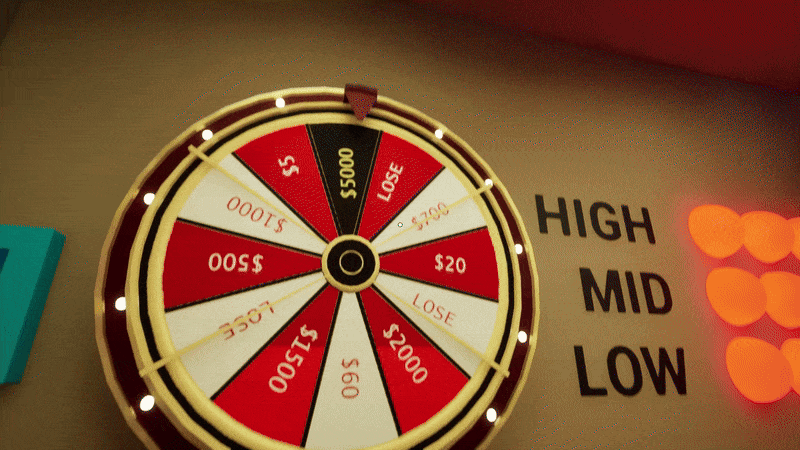
In the fourth area, there are five wheels. To unlock the big wheel. the player must use the four smaller wheels. The combination is shown in the first four rooms. There are statues of a playing card suit. The amount of statues in a room equates to the wheel number. So if there are three hearts in one room, then the third wheel must point at the heart. For the big wheel, the player must land on each tier of value in order. The player can land on the lose sections of the wheel 7 times before the board resets. If a category is complete, the board will not reset that category. Once all values have been landed on, the lights will change to a pattern, this is the code to the vault door.


In the fifth and final area, the player must find the drawer number that is on the key from the roulette table. In each drawer there is a riddle or a puzzle. The answer to these is the next drawer's number. The final drawer has the key card for the elevator to escape the room.
Game Highlights (What I Worked On)
Gameplay

Higher or Lower
The mechanics of this puzzle if quite simple. There is one master card blueprint that is used as a child actor for the whole puzzle. When the player interacts with a card, a timeline plays in the blueprint, causing it to flip around. When the player loses, that timeline simply plays in reverse. I created an enumeration to be used in the master card actor which tells it whether it is higher or lower than the previous card. The buttons to the side pick the choice, and then when the player flips the card, a branch check is called, seeing if the the choice of higher or lower matches with the one assigned to that specific card.

Bingo
For bingo, each number has an invisible circle that the player can click on, this activates the movement of the pen which uses a Component Move To node to control the movement and rotation of the pen and lid. Once the pen reaches the bingo card, the circle becomes visible, showing that that number has been marked off. I hired a voice actor to make the bingo calls. These calls are on a sound array variable, calling randomly.

Slot Machines
The slot machines utilise the story pickups as they tell the player which order the symbols must be on the slot machines. When the player interacts with a slot machine, a Move Component To node fires to move the lever, and a timeline plays to spin the wheels. If at least one of the wheels land on the correct symbol, the player can interact with the Hold button below that wheel. This is a child actor which fires a custom event that tells that wheel to not spin when the player pulls the lever again.

Blackjack
Blackjack uses very simple mechanics. When the player interacts with the table, the camera switches to the camera on the table. Then, when the player clicks on a card or the scorecard, A Move Component To node fire, flipping it over, rotating it so it's straight, and moving it towards the camera to show it to the player. This movement is reversed when the player clicks on the card again to move it back to its original position.

Roulette
The roulette table is a master blueprint actor that utilises multiple child actors inside. Each number on the table has a child actor on top. Only five chips can be on the table at a time. One is added to an integer variable to count how many chips are on the table at a time. When the player interacts with the number, a branch check sees is that integer variable is less than five, if it is, a chip appears, if not, nothing happens. When the player interacts with a number that has a chip on it, the chip disappears and one is taken away from the integer variable. When the correct numbers have chips on it, the player will spin the roulette wheel, which checks if the numbers are correct using another variable. If it is, the wheel will pop off after spinning, revealing a key.

Small Wheels
The small wheels are just one blueprint that talks to the big wheel blueprint. Each symbol is a variable, and each wheel has its own variable that the symbols must match. When all four match, the big wheel is unlocked, checking a Boolean variable in the big wheel blueprint.
Big Wheel
The big wheel uses a timeline to spin and has a variable for the speed. The speed is changed using the lever and the secret button. The lever has three modes, slow, normal, and fast. The secret button changes the speed to very slow, which just goes onto the next value on the wheel. When the wheel lands on the lose section, a variable for lose will increase by one, this can only go up to seven until the game resets. When the wheel lands on a correct value, the light that corresponds to that value will turn from red to green.

Vault Drawers
The vault drawers are very simple, the first drawer unlocks using the key from the roulette table. All of the other drawers unlock after the player inputs the correct drawer number in the keypad after figuring out the question in the drawer. Each drawer has a Boolean which checks if it is unlocked or not. The puzzles/riddles in the drawers are decals using textures made in Photoshop. The platform in the middle moves the ladders left and right. The player must spin the platform to face the side they want to control. The platform blueprint calls both ladders. The ladders move using a Move Component To node which updates its location.

Combination/Code Locks
The combination lock works by clicking on the individual meshes in the lock blueprint and updating its rotation using a timeline to spin it. There are three float variables for all three values. When the player spins the lock, the values are updated. Once all three are correct, the player's view will go back to the player camera and the box will open.
For the keypads, the codes are four digits. When the player inputs four digits, an integer variable is updated, and if the code is wrong, a red light shows, an error sound is played, and the variable is cleared. When the player inputs the correct code, a green light will show, a correct sound will play, and the drawer/door will unlock or open.

Pickups
The pickups work on one master pickup. It has been made in a way where it can be placed in the editor, and the static mesh, the texture, the name of the item, and the texture that shows in the inventory.
Game Highlights (What I Worked On)
UI/UX

Inventory, Notes, and Clues List
The inventory, notes, and clues list operate under one mater widget which utilises many sub-widgets. When the player interacts with a pickup item, the item will fire a blueprint interface event that will add the item to the inventory. When a key or key card has been used, it will be removed from the inventory. When viewing the inventory, the player can click on an item to view it more closely.
The notes section is a feature that I think should be in a lot of escape room games. It is used to keep a note of anything that will be useful for different puzzles. It is just a text component in a sub-widget contained in a scroll box to allow the player to type as much as they need.
The clues section shows all of the clues that the player has unlocked. When they open the menu, the category of the clue is shown and the player needs to click on it to reveal the unlocked clue.

Clues
For the clues, the player has a five minute delay before the player can get a clue. If they try to get a clue before that timer is up, they are greeted by a message from the croupier telling you to wait. When the player is able to receive a clue, a screen will appear showing categories, these are all of the puzzles. By default, these categories will appear as question marks. This will change to the puzzle title once the puzzle has been interacted with at least once. This way, it makes it easier and guarantees that the player will receive a useful clue for the puzzle that they are stuck on. Once they have received their clue, it will appear it the clues section in the inventory, and the five minute timer will restart.

Main Menu With Sub-Menus
The main menu is very simple, just a play button, options button, and a quit button. The options section has three drop down parts to it which are, video settings, audio settings, and controls.
The video settings control the window mode and the screen resolution.
The audio settings just control the master volume for the game.
The controls just show the controls. These are not customisable.

Pause Menu
The pause menu features a resume game button, an options button (this works the same as the one in the main menu, refer to main menu section), a return to main menu button which opens the level to the main menu, and a quit to desktop button which fully closes the game.